AOC 24G2U review: the budget 144Hz IPS bargain

The AOC 24G2U has been the default budget gaming monitor for years, and it still earns it: a genuine 144Hz IPS panel with a height-adjustable stand for the kind of money most rivals charge for a basic TN screen. Here is why it remains our best budget pick.

Transparency: This article contains affiliate links. If you buy through one of them, we may earn a commission, at no extra cost to you. That is how we fund our testing and keep this site independent. More about how we test.

Contents

Every category has one product that becomes a byword for value, and in budget gaming monitors that product is the AOC 24G2U. It did something genuinely disruptive when it launched, putting a proper IPS panel, a 144Hz refresh and a fully adjustable stand into a monitor that cost less than most 60Hz office screens. Years on, plenty of rivals have tried to undercut it, and almost none have managed to beat the whole package. If you are building a first gaming PC on a budget, this is still the rational choice.

Specifications

Model Price ResolutionRefresh ratePanel / size Rating Link
AOC 24G2U 24" Full HD 144Hz IPS Gaming Monitor ★ Top pick AOC 24G2U 24" Full HD 144Hz IPS Gaming Monitor £129.99 1920 x 1080 (Full HD)144 HzIPS, 24" ★ 4.4 View →
★ Top pick
AOC 24G2U 24" Full HD 144Hz IPS Gaming Monitor £129.99
Resolution : 1920 x 1080 (Full HD)Refresh rate : 144 HzPanel / size : IPS, 24" ★ 4.4/5
View on Amazon →

Our in-depth review

BEST BUDGET
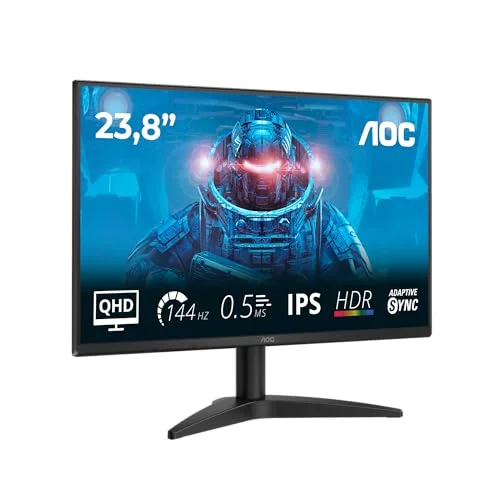
AOC 24G2U 24" Full HD 144Hz IPS Gaming Monitor - gaming monitor AOC

AOC 24G2U 24" Full HD 144Hz IPS Gaming Monitor

4.4/5

£129.99

1920 x 1080 (Full HD) · 144 Hz · IPS, 24"

  • Outstanding value for a 144Hz IPS panel
  • Good colours and viewing angles for the price
  • FreeSync Premium for tear-free play
  • Height-adjustable stand, a rarity at this price
  • 1080p looks soft on a desk-close 24" if you sit far back
  • Stand can wobble when knocked
Image quality 4/5
Response 4/5
Value 5/5
View on Amazon →

The verdict from Adam Khan, display and gaming hardware tester

The best budget choice. The AOC 24G2U has been the default value pick for years, and it still earns it: a proper 144Hz IPS panel with a height-adjustable stand for well under £150. For competitive shooters at 1080p where high, stable frame rates matter more than pixel count, it is hard to beat. If you are building a first gaming PC on a budget, this is the rational monitor.

Fast and fluid at 144Hz, with colours far better than the cheap TN panels it replaced.

Who is the AOC 24G2U for?

The 24G2U is the right monitor if you are on a tight budget, play mostly at 1080p, and care more about smooth, high frame rates than the last word in sharpness. At 24 inches and Full HD it is the classic competitive size, small enough to take in at a single glance, and the 144Hz refresh is the single biggest upgrade you can make over a 60Hz screen. It pairs especially well with budget and older graphics cards, because 1080p is easy to drive at high frame rates, so you actually get to use all 144Hz.

It is less suited to anyone who wants a noticeably crisper, more detailed image, or who sits far back from the screen, in which case 1080p on 24 inches starts to look soft and you should step up to the 27-inch QHD LG UltraGear 27GP850. It is also a PC-first monitor: it works with consoles but only at 1080p, so console-led buyers are better served elsewhere.

How the AOC 24G2U performs

Image quality

The headline is that this is an IPS panel, not the cheap TN screens that used to define this price bracket. That means good, natural colours and wide viewing angles rather than the washed-out, angle-dependent look of old budget monitors. At a normal desk distance 1080p is perfectly sharp on a 24-inch panel. It will not match a QHD screen for fine detail, but for the money the image quality is genuinely impressive.

Response and motion

The 144Hz refresh is the whole point, and it delivers exactly the fluid, responsive feel that makes games feel faster. Motion is clean and the panel keeps up well in fast play. It is not as razor-sharp in motion as a premium 1 ms IPS panel like the 27GP850, but at this price you are unlikely to notice, and most players moving up from 60Hz will be delighted.

Sync and inputs

FreeSync Premium keeps play tear-free with AMD cards and works in G-Sync Compatible fashion with many Nvidia cards too. There is a sensible spread of inputs, including DisplayPort, plus a USB hub and built-in speakers, which, while basic, are a bonus you do not always get at this price.

The stand: the secret weapon

The single most surprising thing about the 24G2U is its stand. A full height, tilt, swivel and pivot adjustment is something budget monitors almost never include, and it transforms day-to-day comfort, you can set the screen at the right height instead of propping it on books. That one feature alone makes it feel far more grown-up than its price suggests.

The honest downsides

There are only two real compromises, and both are exactly what you would expect at this price. The resolution is 1080p, so it is not as sharp as a QHD panel and will look soft if you sit a long way back or want desktop crispness for work. And the stand, while wonderfully adjustable, can wobble a little if the desk is knocked. Neither undermines the core value proposition, you are getting a fast, good-looking IPS panel with a great stand for very little money.
Frequently asked questions

Q
Is the AOC 24G2U still worth buying in 2026?

Yes. It remains the default budget recommendation because little else offers a genuine 144Hz IPS panel with a height-adjustable stand for the money. Newer rivals exist, but few beat it on value. If you are on a tight budget and play at 1080p, it is still one of the smartest buys you can make.

Q
Is 1080p enough on a 24-inch gaming monitor?

On a 24-inch screen, 1080p is perfectly sharp at a normal desk distance and keeps frame rates high, which is exactly what competitive players want. If you sit far back or want a noticeably crisper, more detailed image, step up to a 27-inch QHD panel such as the LG UltraGear 27GP850 instead.

Q
Does the AOC 24G2U work with consoles?

It works with a PS5 or Xbox Series X, but only at 1080p and up to 120Hz over its inputs, so you won't get 1440p or 4K. For console-first gaming, a 4K HDMI 2.1 monitor like the Gigabyte M28U is a better match; the 24G2U is best thought of as a budget PC gaming monitor.

Verdict on the AOC 24G2U

The 24G2U remains our best budget pick because nothing else packs a genuine 144Hz IPS panel and a fully adjustable stand into this little money. For a first gaming PC, a budget build, or a competitive 1080p setup where high frame rates matter most, it is still the smart buy years after launch. Its limits are simply those of its price: 1080p sharpness and a slightly wobbly stand. If you can stretch your budget and your GPU allows, the 27-inch QHD LG UltraGear 27GP850 is the natural step up. Either way, start by matching the monitor to your hardware, our resolution and refresh rate guide and full buying guide show you how.